Images, carousels of up to 10 and reels. First comment included.
SMB & agency tool Coming soon
Cadence
Your agent drafts.
You approve.
Cadence is a social media scheduler that your AI agent can drive. It can draft and schedule up to 50 posts at a time. Only a person can approve, and posts go out on time, once.
- Facebook Pages
- YouTube
Agent keys cannot approve or publish.Every agent post shows "Drafted by agent".
01 / Why we built it
Once a post is live, a few hundred people have probably seen it before you can delete it. For a small business or an agency, one wrong offer or a typo in a client’s name usually costs more than the whole month of posting earned.
We schedule posts for our own brands, and the mistakes that hurt are rarely dramatic ones. It’s the old caption left on a new reel, the client who never saw the post before it went out, or the morning slot that didn’t fire while everyone assumed it had. Most scheduling apps we tried were built for one creator posting for themselves. Cadence is for the person who gets the phone call when the wrong thing goes out.
That’s why approval sits at the centre of Cadence. Whatever the approver saw is exactly what gets published, at the time they agreed to.
The same reasoning applies to AI agents. They are good at the repetitive part of social, like writing a week of captions or scheduling 20 reels. The last step is where they can do real damage. Cadence lets an agent do the first part and keeps a person on the second.
02 / The scheduler
Before any agent touches it, Cadence is a full scheduler. Connect your accounts, plan the month and let approved posts go out on time.
Facebook Pages
Text, photos and multi-photo posts to the Pages you manage. First comment included.
YouTube
Video uploads that go live at the time you set.
Text and image posts to your profile. First comment included. Company pages come later.
- Posting times per channelA weekly grid of slots for each channel. Add to queue and the post takes the next free one.
- Or an exact timePick the date and time yourself when a post has to go out at 7:30 on Friday.
- CalendarWeek and month views of everything scheduled, waiting, posted or failed.
- Images and videoUpload once. The file is locked after upload, so the approved file is the one that posts.
- First commentPut the link or the hashtags in the first comment on Instagram, Facebook and LinkedIn.
- Live phone previewSee how the post looks on each platform while you type.
- Approval before anything goes outIf the caption, media, channels or time change after the approver looked, the approval is refused.
- Roles that match a real teamViewer, contributor, approver, admin and owner. Limit a member to specific channels. Invite by email.
- One workspace per clientEach brand gets its own channels, posting times and team. Switch from the sidebar.
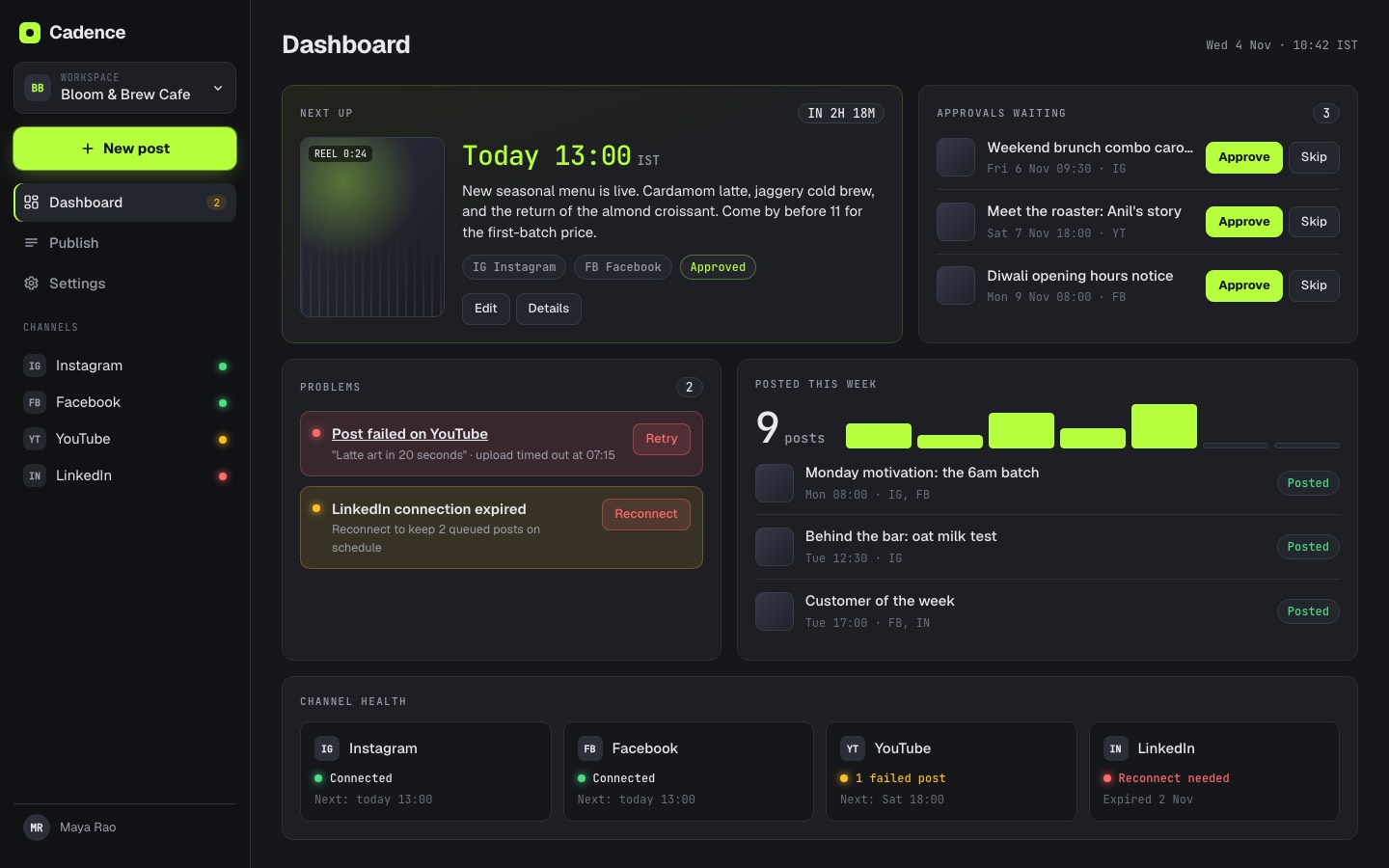
- A dashboard that shows what needs youThe next post, approvals waiting, failed posts and expired connections.
- Your timezoneTimes stay right in your timezone, including when the clocks change.
- Never twiceIf a post may already have gone out, Cadence checks with the platform before it retries.
Not in yet: analytics, a social inbox, caption writing and CSV import. X and Threads are planned.
03 / The extra: connect your agent
One API key from Settings, one command. Other tools let an agent post straight to your audience. In Cadence, an agent can only draft and schedule; a person releases it.
Claude Code
claude mcp add --transport http cadence https://api.productsdecoded.com/api/mcp \
  --header "Authorization: Bearer <your key>"
Codex, Cursor, Holt and other MCP agents use the same key in their MCP config. Once connected, an agent can check your channels and posting times, read the queue, draft and edit posts, upload media from a link, check platform rules before it schedules, and queue up to 50 posts in one go.
- →Agent keys can draft and schedule. They cannot approve or publish.
- →Each key can be limited to specific channels, and it expires.
- →Revoke a key and the agent loses access straight away.
- →Every agent post shows “Drafted by agent” to the approver.
04 / Better together
Cadence works on its own. It also fits into a pipeline with two of our other tools.
 1inkwell makes the ad videos and reels from a product URL.
 2Holt is the agent on your machine. It remembers your brand voice and past posts, and drives Cadence.
3Cadence holds the week for approval, then publishes on time and never twice.
Holt is free and open source. Setting it up for you is a paid service on its own, and free when you buy Cadence. inkwell is sold separately. Want them set up for your team? Ask about the setup package.
05 / The product
Real screens, with sample data from a made-up cafe. Click any one to flip through them.
-
The dashboard: what posts next, what is waiting, what broke.
-
The calendar: a week of posts, colour coded by status.
-
The composer, with a live preview per platform.
-
The publish view: everything queued, by day.
-
Posting times: a weekly grid per channel.
-
Team: roles, invites and who can approve.
-
On a phone: approve from anywhere.
06 / Built to be trusted with your accounts
-
It never double-posts
Publishing is crash-safe. If a post may already have gone out, Cadence checks with the platform before it tries again.
-
Times are right
Scheduling follows your timezone, including when the clocks change.
-
Your logins are protected
Channel access is stored encrypted. Disconnect a channel and its access is deleted.
-
Your data stays yours
We do not sell it, to advertisers or anyone else. Privacy policy, terms and a data deletion page are all written down.
Be one of the first to use it.
Cadence is built and not launched yet. Early access is open.
Want something like this built for your business? Talk to the studio →
← Back to all products